
How to Automate Your SEO Content Workflow
Picture new, search-optimized articles landing on your site every day—already matched to your brand voice, internally linked, and ready to rank—without anyone on your team opening a Google Doc. That is what a fully automated pipeline looks like, and for most small businesses and SaaS teams it takes 2–4 hours of setup, then runs on autopilot for around $99/month with light oversight. If you want to learn how to automate seo content workflow without turning it into a part-time job, the work is mostly in the guardrails you set up front.
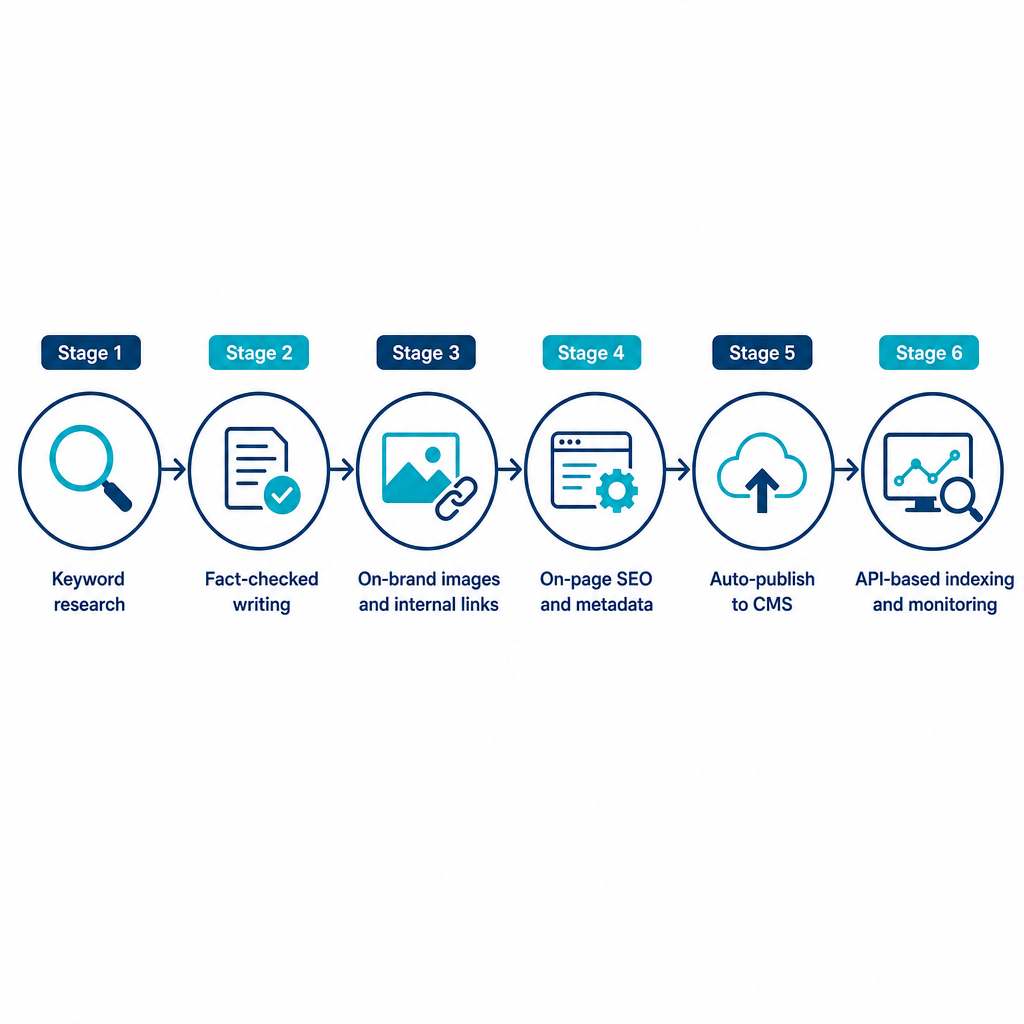
With our platform, AymarTech connects directly to WordPress, Shopify, Webflow, and Wix to research low-competition keywords, write fact-checked articles, generate on-brand images, add internal links, and publish on the schedule you choose. The steps below walk through prerequisites, the full setup sequence, the mistakes that quietly waste your budget, and the point where doing it yourself stops making sense.
Table of contents
- • What you need before you automate
- • The setup sequence, step by step
- • Handling indexing with Google without cutting corners
- • Common mistakes and how to fix them
- • DIY stack versus an all-in-one platform
- • Frequently Asked Questions
What you need before you automate
Automation amplifies whatever you feed it. Point it at fuzzy goals and it publishes fuzzy content, faster. Confirm these prerequisites before you connect anything.
- Clear goals and a target reader. Decide whether success means organic traffic growth, demo signups, ecommerce revenue, or leads from specific topics and regions. That definition drives every keyword the system picks.
- CMS access. Make sure you can connect the blog or content section where automated publishing will happen—WordPress, Shopify, Webflow, Wix, or another supported CMS.
- Verified Google Search Console ownership. Google requires site ownership verification for API-based indexing notifications, and Search Console gives you the performance data to prove the automation is working.
- A basic topic map. Even when the platform discovers low-competition keywords on its own, a short list of core topics, products, and customer problems keeps it commercially focused.
- A brand voice brief. A one-page guide covering tone, reading level, example phrases, and words to avoid keeps automated content on brand instead of generic.
- Governance rules. Decide which categories can publish automatically and which need a human read—evergreen educational posts can usually go live; a high-stakes product launch may not.
If you want the plain-English version of what an automated content engine actually does before you commit, our guide to AI SEO platforms covers the moving parts in more detail.
The setup sequence, step by step
Map your current workflow first, then automate it in order. Skipping ahead is how teams end up with published articles pointing at the wrong pages.
1. Map every step from idea to indexed article. List what happens today: keyword research, outlining, writing, editing and fact-checking, adding images and internal links, publishing, and getting Google to crawl the page. This shows what can be handed off and where you still want human judgment.
2. Choose your approach. An all-in-one platform automates the full lifecycle—research, intent-matched outlines, brand-voice writing, internal links, on-page elements, images, publishing, and indexing. A hybrid stack keeps some existing tools for drafting or review and automates only research, outlines, and publishing. For lean teams, the all-in-one route cuts integration overhead and the number of things that can break.
3. Connect your site and confirm permissions. Link your CMS so finished posts publish directly on your schedule. Verify site ownership in Search Console, which typically means adding a DNS record, HTML tag, or file upload and confirming it. Then check that the platform can create and update posts with the correct author, category, and tags, so content lands in the right part of your site.
4. Configure strategy and calendar. Specify your niche, audience, and major products so the engine stays on commercially relevant topics. Set a cadence—daily, weekly, or custom. Let the platform analyze your industry to build a low-competition keyword calendar aligned with search intent. Then define which product pages, landing pages, and category hubs should receive internal links so each new article reinforces pages you already care about.
5. Set brand voice and quality guardrails. Fill out your business profile so article style matches your voice. Name forbidden topics and phrases—competitors, unsupported use cases, claims that need approval. Finally, choose whether articles queue for human review or publish straight to schedule.
6. Automate drafting and on-page SEO. Once configured, the system generates briefs and drafts that fold target keywords into headings, intro, and body in natural language. Our fact-checking step favors research-backed articles over unverified output to reduce hallucinations. Each post ships with structured headings, meta titles and descriptions, schema-aligned elements where appropriate, internal links to key pages, and on-brand images. Most teams spot-check a weekly sample until the guardrails prove themselves, then loosen up.
7. Automate publishing. Map article types to the right categories or collections, set how tags are generated, and choose a default author for automated posts. Pick your cadence—we can publish one or more optimized articles per day. Confirm your template supports featured images, meta fields, and structured data. After the first few runs, open your CMS and verify posts appear with correct formatting, links, and images at the scheduled times. If you are on WordPress specifically, our walkthrough on auto-publishing blog posts to WordPress covers the connection details.
8. Monitor performance and keep tuning. Review organic traffic, impressions, clicks, and conversions by article and topic cluster to see which content earns its place. Update keyword and topic rules to lean into what performs and drop what doesn't. Adjust cadence based on results rather than a fixed number.
Handling indexing with Google without cutting corners
Faster indexing is where a lot of automation guidance quietly oversteps, so this deserves its own section. Google's Indexing API is officially intended for job postings and livestream event pages, and it requires ownership verification and quota approval. Our platform uses API-based mechanisms to notify Google about new content so pages are discovered faster, but you still have to respect Google's documented scope and policies.
The reliable path for ordinary blog content is straightforward. Keep XML sitemaps current and your internal linking logical so Googlebot can crawl efficiently. Where a content type genuinely fits Google's Indexing API criteria, follow the official Indexing API quickstart—enable the API, create a service account, verify ownership, request quota, and send publish notifications for new or updated URLs. Then confirm results in Search Console using Index Coverage and URL Inspection, watching for warnings or manual actions.
The practical takeaway: automation can alert you the moment content is live and discoverable, but it does not replace ongoing monitoring in Search Console. Treat the API as a narrow, policy-bound tool, not a shortcut around Google's rules.
Common mistakes and how to fix them
Most automation failures trace back to configuration, not the technology. These are the ones that cost the most before anyone notices.
- Publishing without a strategy. Content goes live on schedule but doesn't support any business goal. Fix it by clarifying whether you want traffic, leads, or sales, defining your ideal reader, and configuring topics and keywords to match.
- Weak or inconsistent brand voice. Articles read generic and erode trust. Strengthen the brand voice brief with real examples and specific instructions, then update the business profile so the system can emulate your tone.
- Zero human oversight too early. Occasional factual errors or edge-case claims slip through. Add a lightweight review step for high-stakes posts and spot-check a weekly sample during rollout until you trust the guardrails.
- Misaligned internal links. Automated links point at outdated or low-priority pages. Maintain a current list of priority URLs—product pages, category hubs, cornerstone posts—so links flow toward strategic destinations.
- Slow or missing indexing. New posts don't show up quickly. Verify sitemaps, check for crawl errors, confirm robots.txt isn't blocking the blog, and use URL Inspection to request indexing where appropriate. Keep any API use inside Google's documented scope and quotas.
- Ignoring performance data. Automation keeps publishing while low-performing topics dilute your library. Review Search Console and analytics monthly, consolidate thin content, and reinforce clusters that already win.
DIY stack versus an all-in-one platform
There is a real decision point here, and it comes down to volume and control. A DIY stack earns its keep when you have an in-house SEO and content operations team, need custom workflows for complex formats like whitepapers or multi-language legal content, and are willing to maintain separate tools for keyword research, AI writing, image generation, CMS plugins, and indexing scripts. You get granular control—at the cost of more complexity, more maintenance, and more places for the workflow to break.
An all-in-one approach fits differently. It suits small business owners who want hands-off organic growth without hiring a content team, founders who would rather focus on product than manage writers, and marketing teams scaling content across multiple clients or domains. With AymarTech, that means end-to-end automation from keyword research through writing, images, links, metadata, and publishing; daily fact-checked articles in your brand voice; and multi-language support that helps you reach international audiences and get cited by AI tools that pull from the web.
A simple rule of thumb: if you publish fewer than four to eight SEO articles a month and genuinely enjoy the manual work, a hybrid or DIY setup may be plenty. If you need consistent, high-volume, search-optimized content without expanding your team, a platform that connects directly to your site and runs on autopilot is usually the more efficient and reliable choice. If you're weighing tools, our comparison of how AI SEO writing tools move rankings is a useful next read before you decide.
Frequently Asked Questions
Is AI-generated automated content safe for SEO?
Yes, when the content is genuinely helpful and not built primarily to manipulate rankings. Google's guidance focuses on usefulness and trustworthiness rather than how content is produced, so fact-checking, clear sourcing, and relevance to real readers are what matter.
How long until automated SEO articles start driving traffic?
Most sites see meaningful organic impact over several weeks to a few months, depending on domain authority, competition, and cadence. Solid sitemaps, internal links, and compliant indexing can shorten the gap between publishing and visibility.
What does a realistic budget look like?
Expect a core platform subscription—around $99/month for our automation—plus modest internal time for setup and periodic reviews. Compared with hiring writers, editors, and SEO specialists, that usually delivers a large cost reduction for ongoing content production.
Do I need to disclose AI involvement?
Standard blog content generally isn't subject to a mandatory AI label, but many brands add transparent language such as noting that an article was AI-assisted and reviewed by their team. The real requirement is truthful, non-deceptive content that avoids unsupported claims, especially in regulated fields like health, finance, or legal.
How do I verify the workflow is actually working?
Confirm that new articles appear in your CMS on schedule, that Search Console shows impressions and indexing for fresh URLs within days or weeks, and that analytics attribute organic traffic and conversions to new posts over time. If any of those fail, revisit your platform setup, CMS configuration, and indexing settings before scaling output.